Graphes d'authentification
Sur cette page
Les graphes d’authentification sont l’architecture d’authentification moderne de TOSIAM, implémentée dans le module tosiam-graph. Ils remplacent les chaînes de modules statiques par un modèle flexible de nœuds connectés, permettant de concevoir visuellement des parcours d’authentification complexes.
Concept#
Un graphe est un graphe orienté où chaque nœud (GraphNode) reçoit un contexte mutable (GraphContext) et retourne un résultat qui détermine la transition suivante :
| Résultat | Signification |
|---|---|
REQUEST_INPUT | Afficher des callbacks à l’utilisateur (formulaire) |
GO_TO | Transitionner vers un autre nœud selon un outcome |
SUCCESS | Authentification réussie (nœud terminal) |
FAILURE | Authentification échouée (nœud terminal) |
SUB_GRAPH_EXIT | Sortir d’un sous-graphe par une sortie nommée |
Le moteur (GraphEngine) enchaîne au plus 100 transitions entre deux saisies de l’utilisateur, puis force un échec ; un sous-graphe a sa propre limite de 100.
Contexte partagé#
Tous les nœuds d’un graphe partagent un GraphContext contenant :
sharedState: état mutable (nom d’utilisateur, score de risque, flags…)submittedCallbacks: données saisies par l’utilisateurrequestHeaders: en-têtes HTTP de la requête (RFC 7230)
Créer et gérer des graphes#
Via le Graph Designer (interface admin)#
L’éditeur visuel est accessible dans la console d’administration TOSIAM, menu Graphes d’authentification (/tosiam/console/fr-FR/#/authgraphs). La liste permet de créer, dupliquer, importer et exporter des graphes ; un clic sur un graphe ouvre l’éditeur :
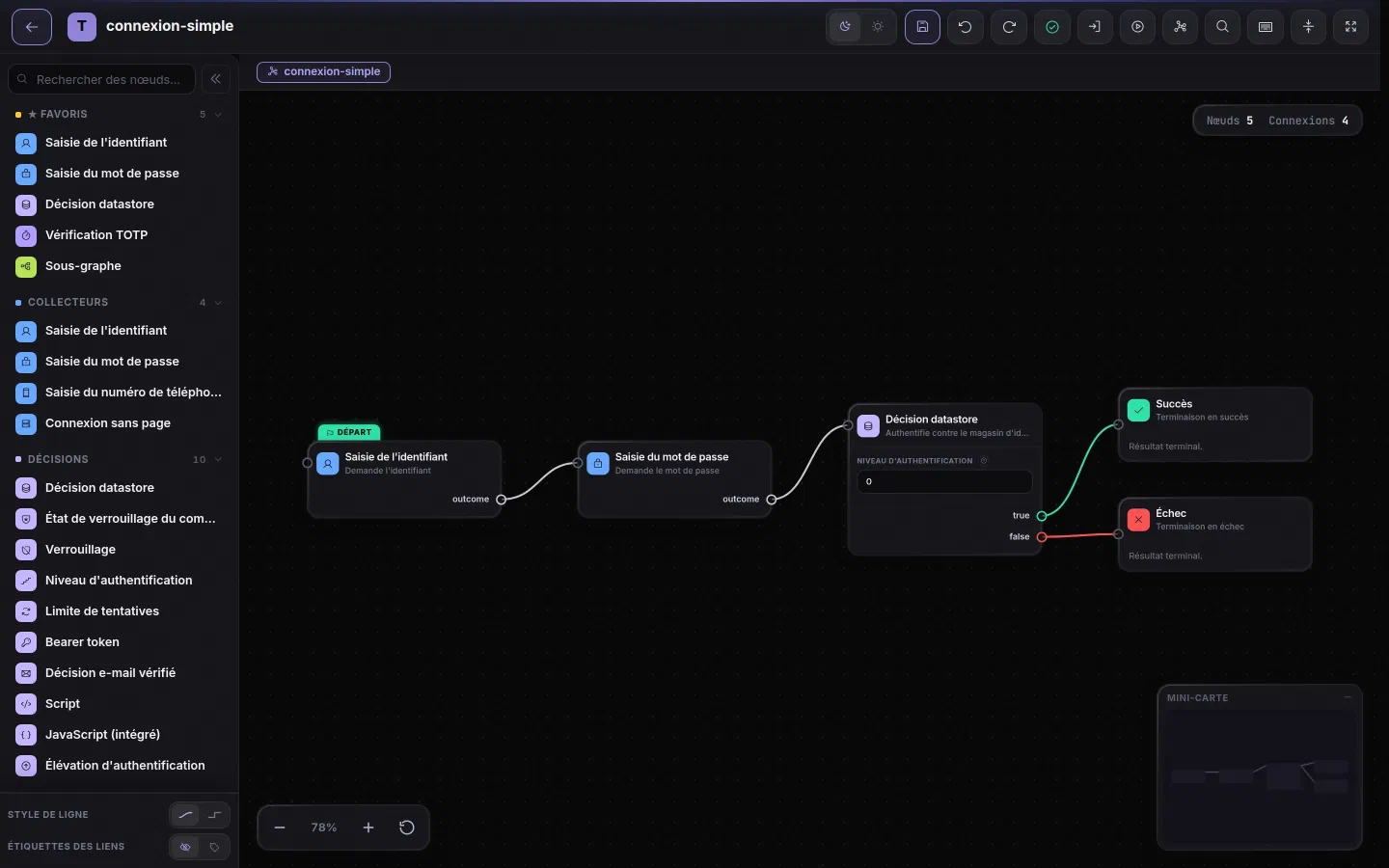
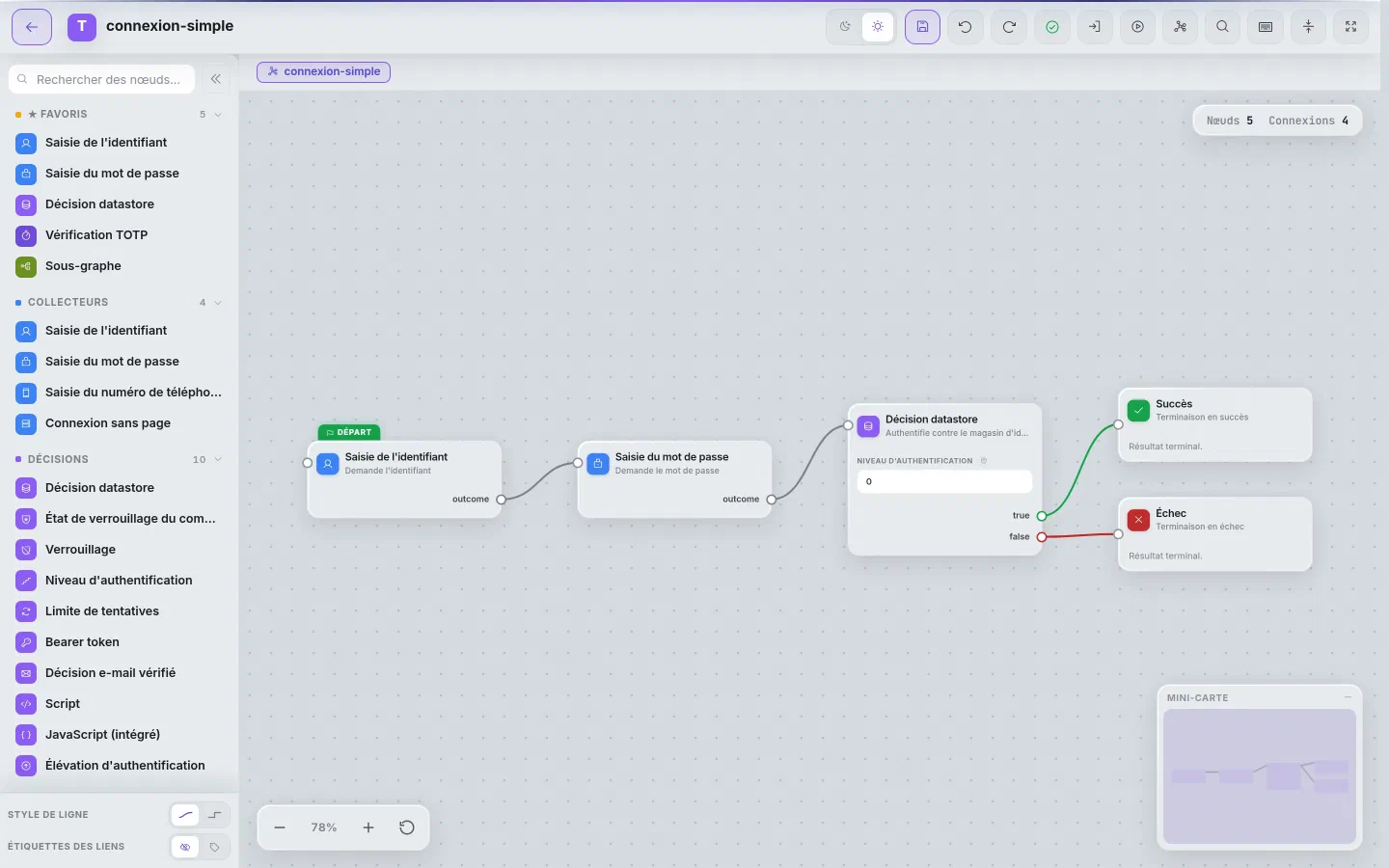
- Palette : les nœuds, rangés par catégorie (favoris, collecteurs, décisions…) et filtrables par recherche, se glissent-déposent sur le canevas.
- Canevas : le premier nœud porte l’étiquette Départ ; chaque outcome (
outcome,true,false…) se relie par un fil à l’entrée du nœud suivant. Les paramètres d’un nœud se modifient directement sur sa carte. - Actions : validation en temps réel (nœuds orphelins, outcomes non connectés), exposition du graphe comme parcours de connexion, et test du flux depuis l’éditeur (aperçu, sans ouvrir de session).
L’éditeur propose aussi l’annulation et le rétablissement, la mise en page automatique, la navigation dans les sous-graphes (fil d’Ariane sous la barre d’outils) et une mini-carte.
Tester un graphe
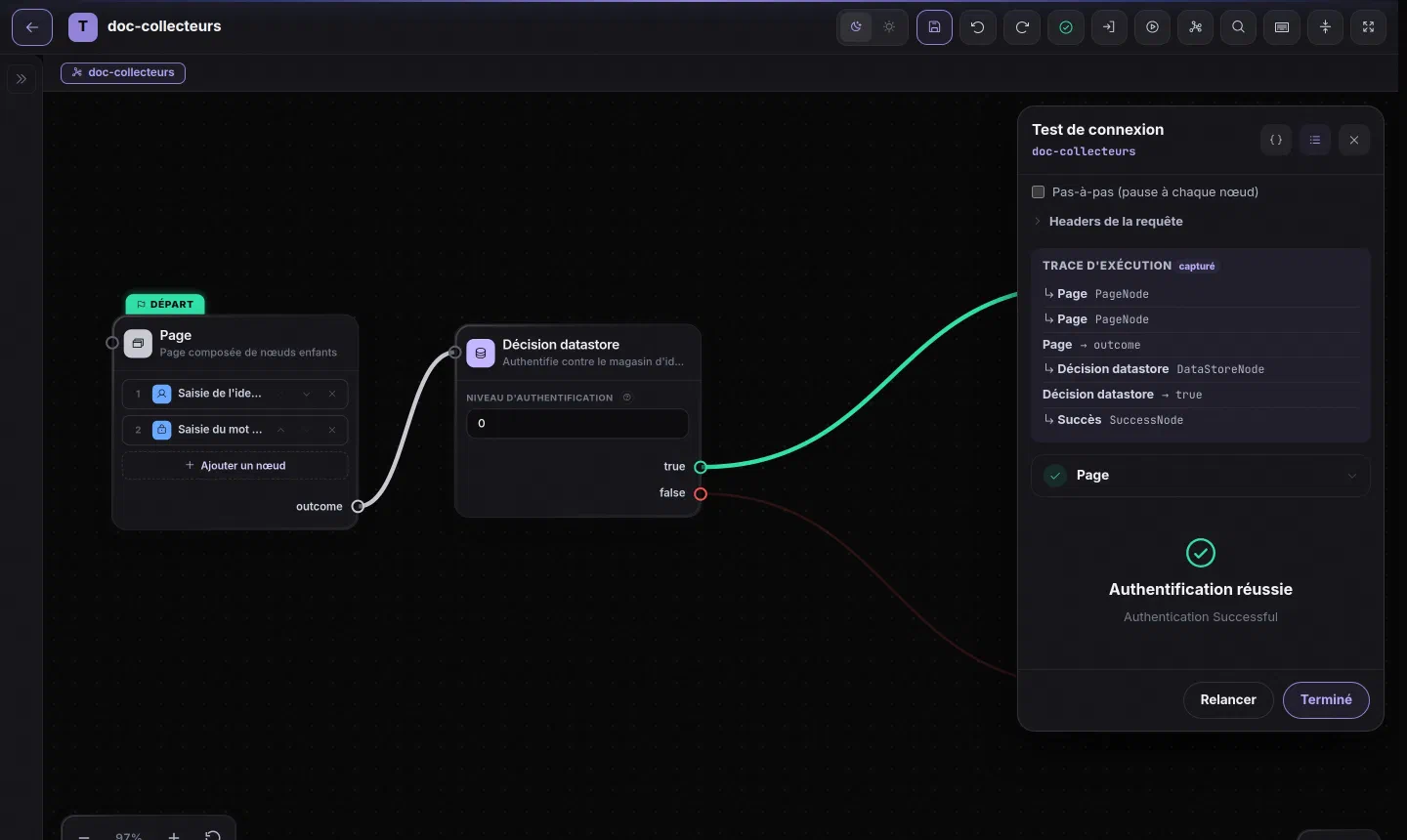
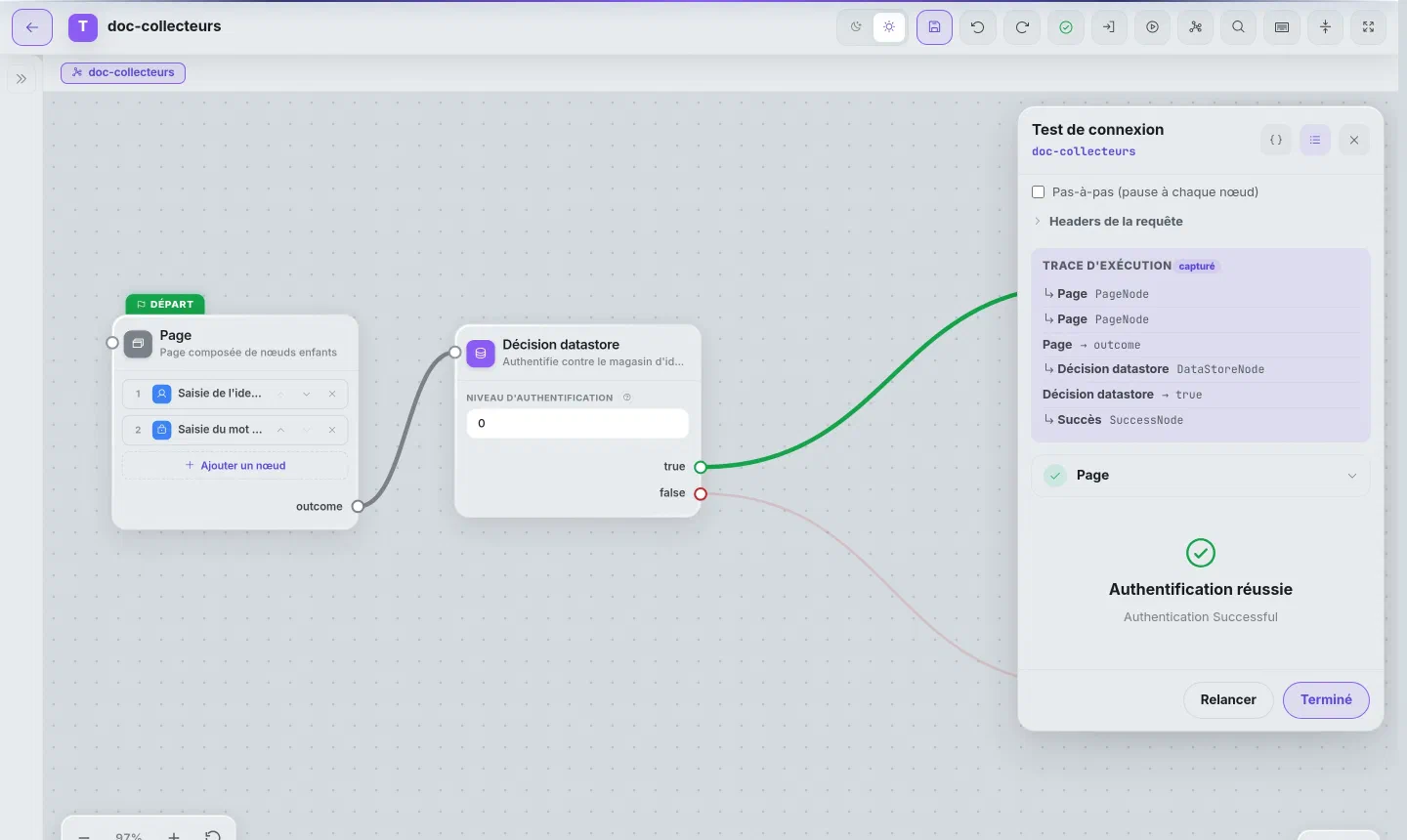
Le bouton Exécuter ce graphe comme connexion lance le graphe dans un panneau de test, sans ouvrir de session : les écrans de saisie s’y affichent, puis la trace d’exécution détaille chaque nœud traversé et son outcome. Le panneau permet aussi d’envoyer des en-têtes de requête, utile pour les nœuds qui en lisent un (collecte de certificat, connexion sans page), et d’avancer pas à pas.
Via l’API REST#
GET    /tosiam/api/realms/{realm}/authgraphs         → lister les graphes
POST   /tosiam/api/realms/{realm}/authgraphs         → créer (nom dans le champ _id)
GET    /tosiam/api/realms/{realm}/authgraphs/{name}  → lire un graphe
PUT    /tosiam/api/realms/{realm}/authgraphs/{name}  → remplacer (ou créer)
DELETE /tosiam/api/realms/{realm}/authgraphs/{name}  → supprimer
Le royaume racine s’écrit root. Les sous-graphes ont les mêmes opérations sous /subgraphs. La session passe en cookie et les écritures demandent un jeton anti-CSRF : voir Import, export et format JSON pour un exemple complet.
Via ssoadm#
ssoadm create-auth-graph --realm / --name monGraphe --datafile graphe.json
ssoadm list-auth-graphs  --realm /
ssoadm show-auth-graph   --realm / --name monGraphe
ssoadm update-auth-graph --realm / --name monGraphe --datafile graphe.json
ssoadm delete-auth-graph --realm / --name monGraphe
Import et export#
La liste des graphes de la console exporte une sélection de graphes, avec leurs sous-graphes, dans un fichier JSON, et importe un tel fichier dans n’importe quel royaume. Voir Import, export et format JSON.
Exposer un graphe comme point d’entrée#
Rendre un graphe accessible à l’authentification demande deux éléments, pas un seul : une instance du module graph-module qui pointe vers le graphe, et une Authentication Configuration (chaîne) du même nom qui la référence. Sans cette seconde étape, l’authentification échoue (config-not-exists) : authIndexType=service résout toujours une configuration, jamais une instance de module isolée.
POST /realms/{realm}/realm-config/authentication/modules/graph-module
{
  "graphId": "monGraphe",
  "iplanet-am-auth-auth-level": "0"
}ssoadm create-auth-cfg --realm / --name monGraphe
ssoadm add-auth-cfg-entr --realm / --name monGraphe --modulename monGraphe --criteria REQUISITEL’URL d’authentification devient alors :
/tosiam/realms/{realm}/authenticate?service=monGrapheCatalogue des nœuds natifs#
TOSIAM fournit 60 nœuds natifs (module tosiam-graph, sauf mention contraire), organisés en familles. Chaque famille a sa propre page, avec le détail des propriétés de configuration et des outcomes réels de chaque nœud (souvent plus riches qu’un simple true/false : enrolled/notEnrolled, allowed/blocked/suspicious, low/medium/high…) :
| Famille | Nœuds |
|---|---|
| Collecteurs | Username, Password, Phone |
| Décisions | DataStore, AccountLockStatus, Lockout, AuthLevel, RetryLimit, BearerToken, StepUpAuth, Script |
| MFA TOTP | TotpVerifier, TotpSecretGenerator, TotpEnrollCommit, TotpQrCodeDisplay, TotpRecoveryCodesDisplay, RecoveryCodeVerify, MfaEnrollmentCheck, MfaChoice, MfaPolicyDecision |
| OTP SMS / Email | SmsOtpSend, SmsOtpVerify, EmailOtpSend, EmailOtpVerify |
| Magic Link | MagicLinkSend, MagicLinkVerify |
| Passkeys / WebAuthn | PasskeyEnrollmentCheck, PasskeyRegistration, PasskeyAuthentication |
| CAPTCHA / Anti-bot | RecaptchaV2, RecaptchaV2Invisible, RecaptchaV3, Turnstile, HCaptcha |
| Risque adaptatif | DeviceFingerprint, GeoLocationDecision, ImpossibleTravel, RiskScore |
| Certificat / PKI | CertificateCollector, CertificateValidation |
| SAML 2.0 | SamlRedirect, SamlCallback |
| Social Login / OIDC | SelectSocialProvider, OidcRedirect, OidcCallback, OAuth2Callback, FetchUserInfo, NormalizeProfile, EmailVerifiedDecision, AutoProvisionUser, SocialAccountLinking |
| SSO Persistant | PersistentSso, SetPersistentSso |
| Lifecycle utilisateur | Consent, TermsAndConditions, PasswordChange, PasswordExpiration, PasswordHistory, ProfileCompleteness |
| Session & Utilitaires | SetSessionProperties, Page, SubGraph, SubGraphExit, Success, Failure |
Un exemple concret de graphe (boucle de nouvelle tentative avec RetryLimitNode) est disponible sur la page Nœuds : décisions.
Sous-graphes#
Les sous-graphes permettent de factoriser des séquences réutilisables (ex: un bloc “vérification MFA” partagé entre plusieurs graphes principaux).
ssoadm create-sub-graph --realm / --name verif-mfa --datafile verif-mfa.json
ssoadm list-sub-graphs  --realm /
Un SubGraphNode inclut un sous-graphe en y accédant par son nom. Ses SubGraphExitNode définissent les sorties nommées disponibles pour le graphe parent. Un sous-graphe peut déclarer des paramètres, utilisés sous la forme ${nom} dans ses réglages : voir Sous-graphes paramétrés.
Format JSON d’un graphe#
{
  "startNodeId": "node-1",
  "steps": {
    "node-1": {
      "type": "UsernameCollectorNode",
      "config": {},
      "outcomes": { "outcome": "node-2" }
    },
    "node-2": {
      "type": "PasswordCollectorNode",
      "config": {},
      "outcomes": { "outcome": "node-3" }
    },
    "node-3": {
      "type": "DataStoreNode",
      "config": {},
      "outcomes": {
        "true": "success",
        "false": "failure"
      }
    },
    "success": { "type": "SuccessNode", "config": {}, "outcomes": {} },
    "failure": { "type": "FailureNode", "config": {}, "outcomes": {} }
  }
}
Un graphe compte au plus 50 étapes. Le détail des champs (position dans l’éditeur, pages multi-nœuds, paramètres de sous-graphe) est sur la page Import, export et format JSON.
Validation#
Le Graph Designer vérifie automatiquement :
| Code | Niveau | Condition |
|---|---|---|
no-start | Erreur | Aucun nœud de départ défini |
broken-edge | Erreur | Outcome vers un nœud inexistant |
dangling-subgraph | Erreur | Référence à un sous-graphe inexistant |
dead-end | Avertissement | Outcome non connecté |
unreachable | Avertissement | Nœud non atteignable depuis le départ |
empty-composite | Erreur | Page (PageNode) sans nœud enfant |
no-identity | Avertissement | Un chemin mène au succès sans qu’aucun nœud n’identifie l’utilisateur |
Une décision scriptée qui ne déclare aucun résultat est aussi une erreur. Ces contrôles sont faits par l’éditeur ; le serveur, lui, refuse seulement un graphe mal formé (départ ou étape inexistants, étape sans type, plus de 50 étapes).
Extension par SPI#
Pour ajouter un nœud personnalisé, implémenter GraphNode et annoter avec @NodeMetadata :
@NodeMetadata(type = "MyCustomNode", configClass = MyConfig.class, outcomeProvider = MyOutcomes.class)
public class MyCustomNode implements GraphNode {
    @Override
    public NodeResult process(GraphContext context) {
        // logique métier
        return NodeResult.goTo("true");
    }
}
Les services injectables incluent : EmailSenderService, SmsSenderService, PasskeyService, GeoLocationService, DeviceFingerprintStore, UserProvisioningService, RecaptchaVerificationService.
Mis à jour le